The management of script sharing is limited to project Owners or collaborators with Admin privileges. The script can be shared in one of two ways.
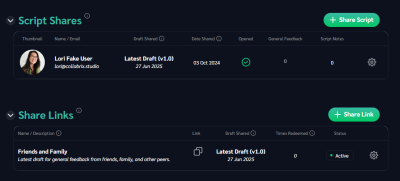
1) Share individually via email. Upon submitting the form, an email invitation is sent to the person with a secure code that can only be redeemed with an account that uses the email address you provided. This provides the highest level of security. If the user is already registered with Collabrix, they will receive a notification and have immediate access. (Note: if the user registers with a different email address than you sent the invitation, we give them an opportunity to request access at their preferred email address).
2) A generic share link that can be redeemed over and over. These are ideal when distributing your script to numerous people (e.g. sharing with a screenwriting group). When redeeming the link, the person must register or log into the platform. At this point their access is logged and they will appear in the list of users who have access to the script.
Draft Shared When sharing, you can assign access to a specific draft, or always the latest published draft. When assigning the “Latest Draft,” the user will automatically access the next draft as soon as it is published. This tool is designed for situations where you want one group of people to see the polished spec script (e.g. investors) while productions edits are made and shared with the production team.
Note that script changes made after the most recent version are not visible to any external users until a new script draft is generated.